
Guide to the Event Submission Form
Please find a step-by-step guide to submitting an event via our submission form.
You can also download this page as a PDF by clicking the button below.
If you have any questions or problems, please get in touch with the team.

Add the title of your event here. This is what you would like to appear on your web and brochure listing.

Add the description of your event here. This is what will appear on your web and brochure listing.
Please submit approximately 50 words for the brochure listing. Be descriptive and clarify your audience if not covered by the tags provided (e.g. include the age range if a children’s event). The Festival team reserves the right to edit any marketing copy submitted as a part of the event submission form to ensure all print and e-marketing is as well presented as possible.
If you would like to provide an extended version of the copy to be used on your web listing, please provide this separately to the 50-word brochure copy.
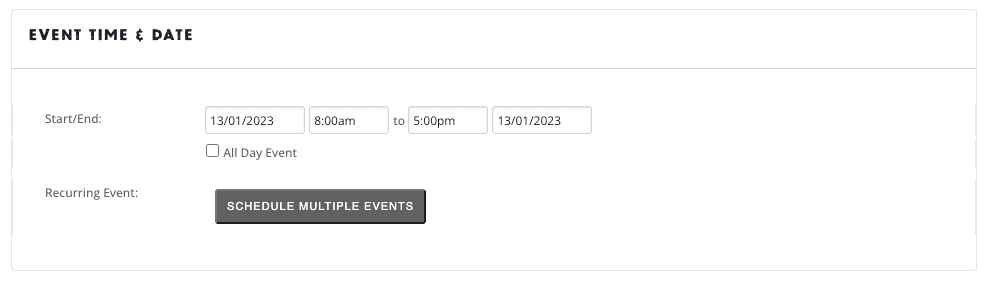
Add the date and time of your event here. Click into the box to select a date.
PLEASE ENSURE YOUR EVENT FALLS WITHIN THE FESTIVAL DATES IN THE CORRECT YEAR.
If you have the same event that recurs during the festival, add all dates here.

Upload a square 1×1 photo without text no larger than 1000 px x 1000 px / 700 KB. If you submit an image with different dimensions, the Festival team will crop your image for your web listing. You can make an image smaller using the free website TinyPNG. Please name this photo with your event title, making it searchable for us after we download (IMG321 isn’t descriptive!)
Images used in the Frome Festival brochure are decided on by the Festival team based on the quality of imagery and design and spacing considerations of the brochure. The Festival team cannot guarantee that any indepedently submitted image will appear in the brochure.

Choose your event categories here. Click into the field to search from a categories drop-down list. You can select more than one category.
Please ensure all categories that you select are relevant to your event.
- Activities
- Comedy
- Dance
- Exhibitions
- Film
- Food & Drink
- Music
- Outdoor
- Science
- Spoken Word & Literature
- Textiles
- Theatre
- Visual Arts & Crafts
- Wellness
If no categories match your event, please get in touch with us.

Choose your event tags here. Click into the field to search from a categories drop-down list. You can select more than one tag.
- Bar Available
- Family Friendly – this is only for events specifically designed for children and families
- Food Available
- Free Event
- Low Cost Event – this is only for events priced up to £5 per ticket
- Over 18 Only
- Wheelchair Accessible
Please ensure all tags are relevant to your event – if no tags are relevant, please do not add any!

Please select your event status as “Scheduled”.

Choose your venue here. Click into the field to search from a venue drop-down list. You can only select one venue.
If no venues match your event, please get in touch with us.

Choose your organiser here. Click into the field to search from a catergories drop-down list. You can only select one organiser.
The Frome Festival team will add you as an organiser once you have been approved as an organiser. If the name of the event organiser does not appear in the list, please get in touch with us.

Enter your ticket URL here.
If you are selling tickets through the Festival Box Office, please leave this field blank – we will insert your ticket link once published.
If the event is yet to be listed, please leave this field blank.

Please fill out the additional queries as required.

Please state your standard ticket price i.e. Adult / General Admission. If your event is free enter a 0.
You will be able to add details of additional concessions in the Additional Fields above.